Profile settings and notifications
Profile Settings
Click the green bubble displaying your initials in the top-right corner of the screen to access your profile settings:
- My information: identity, role, mobile phone number, and email address
- Password: you can change your password by completing the required fields
- Legal resources: legal notices, Terms and Conditions, privacy policy, cookie settings
ℹ️ Would you like to update your personal information? From the "Entity" menu, select the "Users" tab:
|
|---|
Notifications
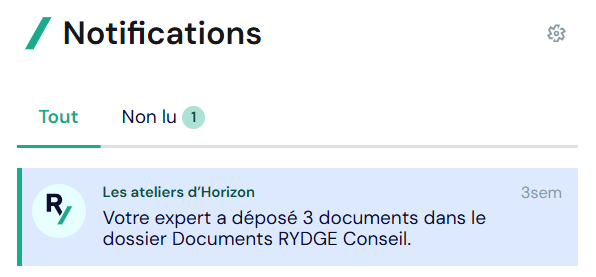
Keep up to date with the latest documents uploaded to your client area by clicking the bell 🔔 next to your profile. You can access all your notifications and filter them to display only unread notifications.
Types of notifications
- Document uploads: whenever your RYDGE Conseil contact uploads one or more documents to your client area
- BI dashboard:
| Notification received when : | Notification channel |
|---|---|
| A BI dashboard is made available in my client area | 🔔 Notification Center |
| My BI dashboard is updated | 🔔 Notification Center |
Notification settings
| 💡 From the settings, you can receive notifications only for your favorite entities |
|---|
Open your notifications, select the settings gear ⚙️, and click "Access notification settings". Then choose the type of notifications for which you would like to adjust your alerts.
For example, for documents, you can choose to receive an alert:
- when a document is uploaded to the Accounting folder
- when a document is uploaded to the Payroll & HR folder
- when a document is uploaded to the RYDGE Conseil Documents folder
If you deselect all notification options, you will no longer receive notifications.
I can't find the document that was uploaded after clicking the notification. What should I do?
If you cannot find the document(s) that were previously uploaded, check that you are in the correct folder. If you are, please contact your accountant or Payroll & HR manager for guidance on the platform.
If this does not resolve the issue, please open a ticket with our Customer Support team.
If you encounter a problem, don't hesitate to contact your support team
on +33 9 73 73 30 00, by email: relation-client@rydge.fr or via the help center available by clicking on the “?” button and then on the “SUPPORT” tab.